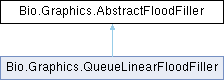
The base class that the flood fill algorithms inherit from. Implements the basic flood filler functionality that is the same across all algorithms.
More...
|
|
Bitmap | bitmap |
| |
|
ColorS | tolerance = new ColorS(25, 25, 25) |
| |
|
ColorS | fillColor = ColorS.FromColor(Color.Black) |
| |
|
bool | fillDiagonally = false |
| |
|
bool | slow = false |
| |
|
int | bitmapWidth = 0 |
| |
|
int | bitmapHeight = 0 |
| |
|
int | bitmapStride = 0 |
| |
|
int | bitmapPixelFormatSize = 0 |
| |
|
byte[] | bitmapBits = null |
| |
|
PixelFormat | pixelFormat |
| |
|
bool[] | pixelsChecked |
| |
|
ColorS | byteFillColor |
| |
|
ColorS | startColor |
| |
The base class that the flood fill algorithms inherit from. Implements the basic flood filler functionality that is the same across all algorithms.
◆ AbstractFloodFiller() [1/2]
| Bio.Graphics.AbstractFloodFiller.AbstractFloodFiller |
( |
| ) |
|
◆ AbstractFloodFiller() [2/2]
48 {
49 if (configSource != null)
50 {
51 this.Bitmap = configSource.Bitmap;
52 this.FillColor = configSource.FillColor;
53 this.FillDiagonally = configSource.FillDiagonally;;
54 this.Tolerance = configSource.Tolerance;
55 }
56 }
◆ FloodFill()
| void Bio.Graphics.AbstractFloodFiller.FloodFill |
( |
Point | pt | ) |
|
|
abstract |
It fills the area of the image that is connected to the point pt with the current color
- Parameters
-
| pt | The starting point for the fill. |
◆ PrepareForFloodFill()
| void Bio.Graphics.AbstractFloodFiller.PrepareForFloodFill |
( |
Point | pt | ) |
|
|
protected |
It takes a point on the bitmap and gets the color of that point. It then creates a new color that is the fill color. It then gets the stride, pixel format size, pixel format, and the bitmap bits. It then creates a new boolean array that is the size of the bitmap bits divided by the pixel format size
- Parameters
-
| pt | The point to start the flood fill from. |
96 {
97 startColor = bitmap.GetPixel((int)pt.X, (int)pt.Y);
98 byteFillColor = new ColorS(fillColor.B, fillColor.G, fillColor.R);
99 bitmapStride=bitmap.Stride;
100 bitmapPixelFormatSize=bitmap.PixelFormatSize;
101 pixelFormat = bitmap.PixelFormat;
102 bitmapBits = bitmap.Bytes;
103 bitmapWidth = bitmap.SizeX;
104 bitmapHeight = bitmap.SizeY;
105 pixelsChecked = new bool[bitmapBits.Length / bitmapPixelFormatSize];
106 }
◆ Bitmap
| Bitmap Bio.Graphics.AbstractFloodFiller.Bitmap |
|
getset |
77 {
78 get { return bitmap; }
79 set
80 {
81 bitmap = value;
82 }
83 }
◆ FillColor
| ColorS Bio.Graphics.AbstractFloodFiller.FillColor |
|
getset |
59 {
60 get { return fillColor; }
61 set { fillColor = value; }
62 }
◆ FillDiagonally
| bool Bio.Graphics.AbstractFloodFiller.FillDiagonally |
|
getset |
65 {
66 get { return fillDiagonally; }
67 set { fillDiagonally = value; }
68 }
◆ Tolerance
| ColorS Bio.Graphics.AbstractFloodFiller.Tolerance |
|
getset |
71 {
72 get { return tolerance; }
73 set { tolerance = value; }
74 }
The documentation for this class was generated from the following file:
- BioLib/Graphics/AbstractFloodFiller.cs

 1.12.0