BioImager  3.9.1
A .NET microscopy imaging library. Supports various microscopes by using imported libraries & GUI automation. Supported libraries include PriorĀ® & ZeissĀ® & all devices supported by Micromanager 2.0 and python-microscope.
Loading...
Searching...
No Matches
microscope.gui.ControllerWidget Class Reference
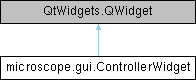
Inheritance diagram for microscope.gui.ControllerWidget:

Public Member Functions

None __init__ (self, microscope.abc.Controller device, *args, **kwargs)
 
None toggleDeviceWidget (self, QtWidgets.QAbstractButton button, bool checked)
 

Detailed Description

Show devices in a controller.

This widget shows a series of buttons with the name of the
multiple devices in a controller.  Toggling those buttons displays
or hides a widget for that controlled device.

Definition at line 75 of file gui.py.

Constructor & Destructor Documentation

◆ __init__()

None microscope.gui.ControllerWidget.__init__ (   self,
microscope.abc.Controller  device,
args,
**  kwargs 
)

Definition at line 84 of file gui.py.

86 ) -> None:
87 super().__init__(*args, **kwargs)
88 self._device = device
89
90 self._button2window: typing.Dict[
91 QtWidgets.QPushButton, typing.Optional[QtWidgets.QMainWindow]
92 ] = {}
93 self._button2name: typing.Dict[QtWidgets.QPushButton, str] = {}
94
95 self._button_grp = QtWidgets.QButtonGroup(self)
96 self._button_grp.setExclusive(False)
97 for name in self._device.devices.keys():
98 button = QtWidgets.QPushButton(name, parent=self)
99 button.setCheckable(True)
100 self._button_grp.addButton(button)
101 self._button2name[button] = name
102 self._button2window[button] = None
103 self._button_grp.buttonToggled.connect(self.toggleDeviceWidget)
104
105 layout = QtWidgets.QVBoxLayout()
106 for button in self._button_grp.buttons():
107 layout.addWidget(button)
108 self.setLayout(layout)
109
Member Function Documentation

◆ toggleDeviceWidget()

None microscope.gui.ControllerWidget.toggleDeviceWidget (   self,
QtWidgets.QAbstractButton  button,
bool   checked 
)

Definition at line 110 of file gui.py.

112 ) -> None:
113 if checked:
114 device = self._device.devices[self._button2name[button]]
115 widget_cls = _guess_device_widget(device)
116 widget = widget_cls(device)
117 window = MainWindow(widget, parent=self)
118 self._button2window[button] = window
119 window.show()
120 else:
121 window = self._button2window[button]
122 if window is None:
123 _logger.error(
124 "unchecking subdevice button but there's no window"
125 )
126 else:
127 window.close()
128 self._button2window[button] = None
129
130

The documentation for this class was generated from the following file: